
Getting Bandera County Court Records
The court that took the filing decides which clerk has it. District civil, felony, family, appeals, and writ matters sit with the District Clerk. That clerk serves the 198th Judicial District Court. The County Clerk holds Constitutional County Court civil, criminal, probate, and juvenile files. Each of Bandera County's four justice courts keeps its own lower-court file. City cases belong to the Bandera Municipal Court clerk. So begin with a court caption or citation. Blanket requests sent to every office at once will not help.
Each route has its use. Search iDocket online for local civil and criminal case information. For covered statewide filings and hearings, turn to re:SearchTX. Free terminals sit in the District Clerk and County Clerk reception areas. You can also call the right clerk to confirm custody. Then go to the counter in person. Or mail or email a written request to the District Clerk. One caution: the Texas Public Information Act covers county administrative records. It does not replace asking a court clerk for a pleading or judgment.
- Identify the filing court, cause number, party or style, and filing year.
- Use iDocket, re:SearchTX, or a reception terminal to confirm the index entry.
- Name the exact docket sheet, order, judgment, pleading, return, or date range wanted.
- Choose plain or certified form and electronic, counter, or mail delivery.
- Ask for a quote, pay through the clerk's stated channel, and check the returned copy.
Bandera Court Record Custodians
Bandera County splits its record-keeping between two constitutional clerk offices. The District Clerk, Hon. Tammy Kneuper, sits at 3360 State Hwy 173 N, Bandera, Texas 78003. Her office answers 830-796-4606 and email at districtclerk@banderacounty.gov. Hon. Tandie Mansfield is the County Clerk. Her office sits at 500 Main Street, Bandera, Texas 78003. Reach it by phone at 830-796-3332. District files live with the first office. The second keeps County Court and probate files. For a case filed with a JP or municipal clerk, neither office is the place to ask.
Call before you go. A quick check keeps your request from landing at the wrong counter, and giving the clerk a court and cause number makes the lookup far easier for both of you.
Court Record Types
A docket is not the whole case file. It is the index and event history. The file behind it may hold documents filed by the parties, process returned by an officer, and signed court actions. Asking narrowly beats requesting an entire file, since a specific document is quicker to quote and easier to verify. Common Bandera County court records include:
- Docket sheets and dated court-setting lists
- Petitions, complaints, answers, motions, and responses
- Informations, indictments, pleas, bonds, and criminal orders
- Judgments, dismissal orders, probate orders, and other signed rulings
- Citations, service returns, exhibits, and available transcripts
Not everything sits in the clerk's ordinary file. Some items are sealed, confidential, redacted, or held elsewhere, and a reporter's transcript may take a separate request. Commissioners Court minutes and land records are County Clerk records too, but they are not court case files.
Bandera Court Record Requests
The District Clerk's written instructions lay out a clear remote path. That path covers Bandera County court records. Describe the search or copy you want. State the name or document. Give an email or mailing address, and request a quote. The office lists districtclerk@banderacounty.gov and P.O. Box 2688, Bandera, TX 78003-2688. Payment comes first, after the quote. The published expectation allows two business days for a defined search. Results are generally emailed after payment confirmation. Copies go out by mail after payment.
Treat that timing as an estimate for a scoped request. It is no promise that an old paper file is already scanned. In your request, include the court, cause number, year range, exact filing, and certification level, and keep the request, quote, and receipt together. When a scan comes back, compare the cause number and page count, and check whether image quality has altered names or numbers.
Inside a Bandera County Court Record
A name result is only a sliver of what a full file can hold. The County Clerk's free name search returns parties, cause number, case type, and filing date. It can also show a bond company. Disposition and disposition date appear when applicable. A clerk-produced document goes further. It adds the text, signatures, stamps, and certification that an index cannot show.
| Court and cause | The filing court and its identifying number, which control custody. |
|---|---|
| Style and type | Case caption, parties, and civil, criminal, probate, family, or other classification. |
| Filing history | Docket entries, file dates, motions, returns, notices, and settings. |
| Orders and result | Signed rulings, judgments, disposition, and later compliance entries when public. |
| Copy proof | Page count, file mark, seal or certification language, and any redaction notice. |
Match what comes back to the court and cause you asked for. A familiar party name alone is not enough.
Bandera Court Record Index
The county's record-search instructions point to iDocket and to public reception terminals. Those routes help locate the case. An online entry, though, may show an order without providing its image. The vendor landing also presents account registration even though the county describes free name searching. If the workflow stops at a login screen or lacks the document, do not assume the record is unavailable. Use the clerk counter or a written request instead.
re:SearchTX adds a statewide layer for cases, filings, document text, and hearings. Access can vary by account role and participating system. Its reported scope excludes criminal case records. eFileTexas is different again. It accepts filings, and it is not a complete public Bandera County court record search. Search, filing, and copy delivery remain three distinct tasks. The re:SearchTX source shows the statewide search entry point.
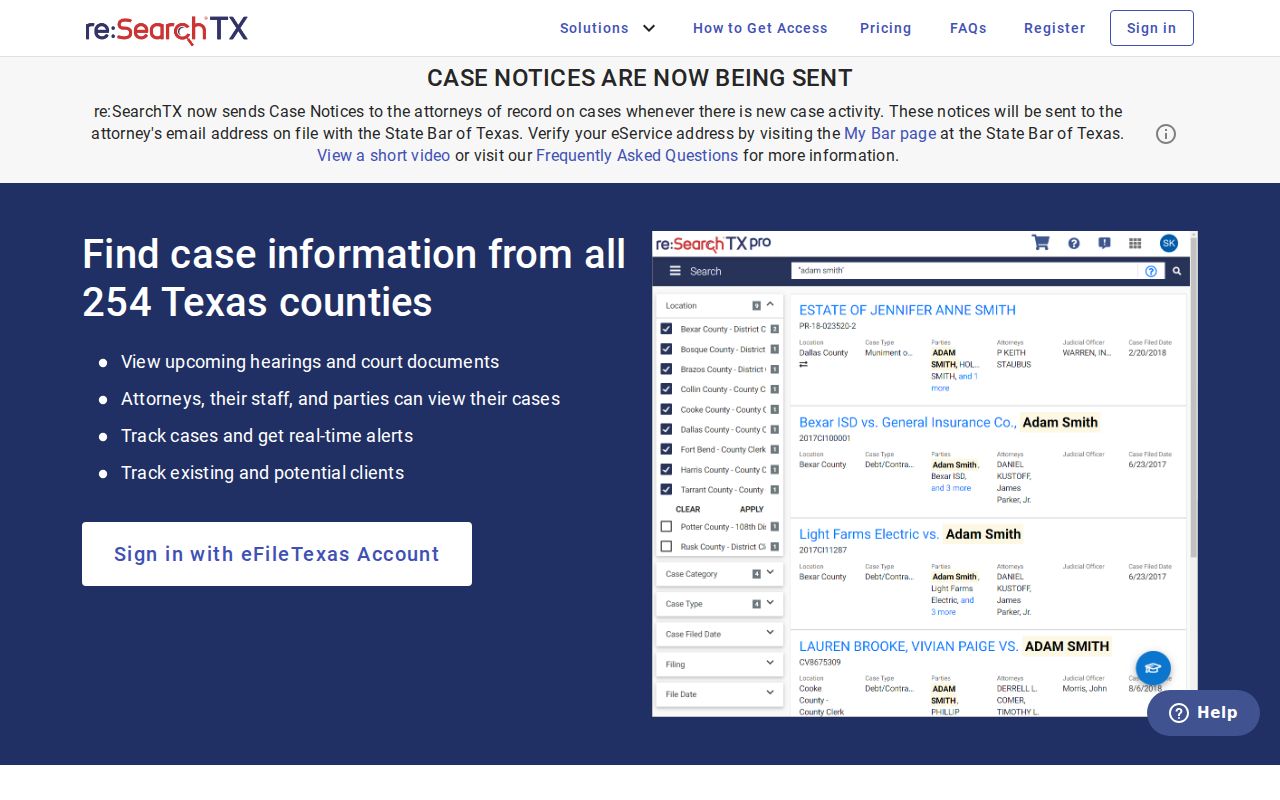
Its separate tabs show why one portal result may not equal the complete file the clerk holds.
Fees and Certified Copies
A plain copy just reproduces the pages you ask for. A certified copy carries the clerk's certificate or seal. That matters when someone needs formal proof. Before ordering, ask the receiving office exactly what proof it requires. These figures follow Bandera's District Clerk instructions and the County Clerk schedule effective January 1, 2024. Confirm the amounts before you pay.
| Bandera record service | Published amount |
|---|---|
| District search, past 15 years | $5 per name and/or document searched |
| District search beyond 15 years | $1 for each additional year |
| District plain copy | $1 per page |
| District certified copy | $1 per page plus $5 seal |
| County Clerk plain copy | $1 per page |
| County Clerk certified copy | $5 plus $1 per page |
| County authenticated copy | $7 plus $1 per page |
| County certificate of fact | $5 |
Bandera posts no electronic document-purchase price for re:SearchTX. Check the portal or the originating clerk directly rather than applying a public-information fee schedule to a court file.
Bandera Court Record Certification
Certification comes in more than one form. A certified copy simply authenticates the reproduced filing. An authenticated copy adds a further layer of verification, and a certificate of fact states something drawn straight from the clerk's record. The County Clerk schedule treats these as distinct products. The District Clerk instructions also permit a search certificate. So ask for the exact product the receiving authority wants. Check the work when the copy arrives. Look at the seal, the clerk language, the court name, the cause number, and the page count. If anything differs from your request, keep the quote and contact the issuing clerk, because a filename or an emailed subject line cannot substitute for those proof marks.
Bandera Court Record Boundaries
One common mistake is sending a court pleading request to the county Public Information Office. Texas treats case records and administrative judicial records as separate things. Bandera County does publish a public-information form. That form serves county departments. Use it for non-adjudicative material such as policies or contracts. A docket sheet, judgment, pleading, or case-file request goes to the clerk holding that case. Land records work the same way. The County Clerk sends land-record users down a separate route. A deed never becomes part of a court file just because a property dispute later reached court. Know what the record is for. Then pick an office.
Bandera Historical Court Records
Bandera County records research reaches beyond current litigation. The County Clerk publishes historical Commissioners Court Books A through E. Book C covers courthouse planning in 1890. It includes action involving architect Alfred Giles and Guindou. Book D lists old courthouse rooms and the movement of offices and records. These are official county minutes, not a modern civil or criminal case file. The historical document index gives the date ranges. For genealogy or local-history work, note the book, page, date, and source URL. For a court case, ask whether the clerk holds an older paper or electronic file. Also ask what date range should be searched.
Sealed Records and Public Access
Texas starts from public access to many court records. That principle has limits. A visible case index does not authorize release of every filing. Juvenile, adoption, certain family, mental-health, expunction, nondisclosure, and sealed material may be withheld or redacted. Sensitive identifiers can also come out of an otherwise public copy. If the original is restricted, ask for a redacted version or a narrower public document.
Bandera access rules:
Texas court-record policy separates case records from judicial administrative records handled under Rule 12.
Texas Government Code Chapter 552 governs public information held by covered government bodies, but does not replace court case-record rules.
Texas Rule of Civil Procedure 76a supplies the court process and standards for sealing court records.
If an office denies a record, ask which order, rule, or law controls and whether a public portion can still be released. A failed portal search is never proof that a case is sealed.